 RuSwitcher
What RuSwitcher can do
Typed ghbdtn when you meant привет? Just tap Option ⌥ and RuSwitcher converts the last word into the right layout - typing it directly, no copy-paste. Works with any pair of installed keyboard layouts - Russian, Ukrainian, Belarusian, German, French, and more. The trigger is fully configurable (a single key or a two-key combo), it can also fix the layout automatically as you type, and it even works through Apple Screen Sharing.
Everything within reach
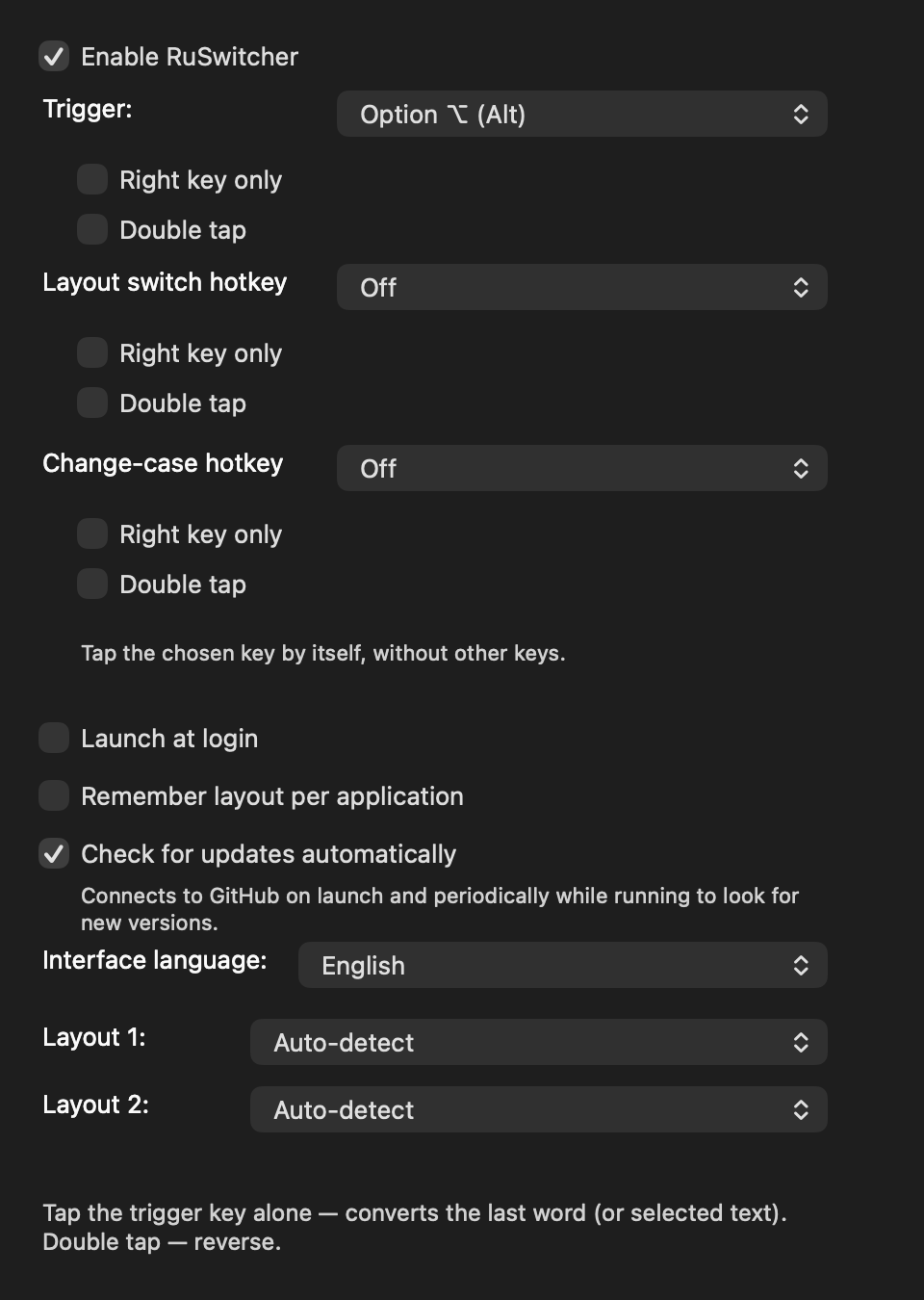
Quick toggles live in the menu bar menu, the rest in Settings. Click through the window's tabs.
Fixing the layout
Smart word detection
Converts the last typed word, including punctuation.
ghbdtn,→привет,Selected text
Select any text and tap the trigger to convert it in place.
Ghbdtn vbh→Привет мирTap again to undo
Reverse conversion if you changed your mind.
⌥ fix⌥ again to undoChange case
A separate hotkey cycles the case of the last word, a selection or the whole line, like in Punto. Off by default (Settings → General).
hello→HELLO→HelloAny two layouts
Configure any pair from your installed system layouts. No hardcoded tables.
Russian ⇄ ABCUkrainian ⇄ ABCGerman ⇄ RussianHebrew - right-to-left (experimental)
The first RTL layout; convert to/from Hebrew with any second layout. Auto-conversion is conservative by design; the manual trigger works both ways.
akuo→שלום
Hotkeys and switching
Configurable trigger
Option, Command, Control or Shift (left/right, single/double-tap), or a two-key combo like ⌘+⇧.
⌥⌥ ⌥⌘ + ⇧⌃ + ⇧Layout-switch hotkey
A separate hotkey that only switches the layout (no conversion), including Ctrl+Shift and other modifier-only combos macOS can't assign; right-key-only and double-tap options. Off by default.
⌃ + ⇧⇧ ⇧Switch layout from the menu
Pick any installed layout right from the menu-bar menu (flag, name, a check on the current one) and click to switch.
🇷🇺 Russian ✓🇺🇸 ABCPer-app layout memory
Remembers the active layout for each application and restores it when you switch back.
Telegram: RUXcode: EN
On autopilot
Automatic conversion (beta)
Optionally fix the layout as you type, with a precision-first system-dictionary check. Off by default.
ghbdtn␣→привет␣Exception lists
A per-app exclusion list plus never-convert and always-convert word lists.
Terminal1PasswordiPhoneRemote desktop (beta)
Fix the layout over Apple Screen Sharing, on the Mac you're controlling.
Screen Sharing
Look and sound
Layout flag at the cursor (beta)
Briefly show the layout flag next to the text cursor right after a switch.
🇷🇺 next to the cursorLayout sound (optional)
A short sound on the first letter after a layout change, so you hear which layout you're in.
♪ first letter after a switchMonochrome menu-bar icon (optional)
A system-style
РУENРУ/ENbadge instead of the colored flag; adapts to light/dark automatically. Off by default.16 interface languages
English, Русский, Українська, Беларуская, Deutsch, Français, Español, Português, Polski, 中文, 日本語, 한국어, Ελληνικά, Български, Հայերեն, ქართული.
РусскийEnglishDeutsch日本語+12
Under the hood
Clipboard-free
The converted word is typed directly via synthesized Unicode, so it works even in Electron / VS Code / Atom-class editors. Your clipboard is never touched (it's only a fallback for unusual apps).
no ⌘C, no ⌘VNo telemetry
Your keystrokes stay on your Mac.
online only for updatesMinimal footprint
No Electron, no web views, pure Swift + AppKit.
1.3 MBUniversal binary
Runs natively on both Apple Silicon and Intel Macs.
Apple SiliconIntelAuto-start at login
Set and forget.
How it works
CGEventTap(passive, listen-only) for keyboard monitoring.UCKeyTranslate(Carbon) for dynamic character mapping between any layout pair.CGEvent.keyboardSetUnicodeStringto type the converted text directly - no clipboard, no pasteboard side effects.CGEventSource.userDatamarker to filter the app's own simulated events.AXUIElementAPI for focused element detection.SMAppServicefor login item management.- No hardcoded layout tables - works with any installed layouts.